A grounding squawk on a corroded tail brace bracket. The red banner stays until someone taps Resolve.
September Update: Squawks, Monthly Flight Hours, and a Help Center
Jason Gould
In today's update:
Important
If you like the App, please leave a great review on the App Store or Google Play. It really helps the platform grow and survive. If you don't think it deserves a great review, please reach out and let's talk about what can fix it!

Before You Fly: Tempest Spark Plug Service Bulletin
Service Bulletin SB-012, August 7, 2026
Tempest Aero Group reports a potential cracking problem in specific lots of Tempest spark plugs manufactured between May 5 and July 29, 2026. Tempest recommends immediate inspection of the affected plugs before the next flight, and replacement of any cracked plug. Plugs purchased before May 5, 2026 are not affected.
The bulletin covers 14 part numbers, each with specific lot codes: UREB36S, UREB37E, UREM37BY, UREM38E, UREM38S, UREM40E, URHB32E, URHB32HS, URHB32S, URHB36S, URHB37E, URHM38E, URHM38S, and URHM40E. The lot code is stamped on the hex of the plug body, below the date of manufacture. The full lot table, the photos of the crack location, and the inspection steps are in the bulletin itself:
Read Tempest Service Bulletin SB-012 (PDF) →Here’s the short version of what Tempest is asking:
- Find your lot codes, either on the plugs themselves or on the FAA 8130 tag from your last plug installation.
- If a plug is from an affected lot, pull it and inspect it for cracks. Replace any cracked plug. New Tempest plugs carry an SB012 compliance stamp.
- Make a logbook entry either way, affected plugs found or not.
- Tempest is covering the cost. Cracked plugs are replaced free, and they reimburse reasonable labor and return shipping. The SB012 Customer Service Hotline is (336) 551-2182 for replacements and (336) 551-2183 for technical questions, or email [email protected].
If your logbooks are in BetterPlane, a search for “Tempest” or the plug part number will turn up your last plug change and the shop that did it.
Fleet Watch: What Changed in the FAA Registry
Our aviation data project, The Small Planes, tracks the FAA Aircraft Registry snapshot by snapshot. Here’s August 7 to September 11.
+272
Net fleet change
7.8 aircraft a day, up from 7.2 last period
+570
New registrations
−298
Removed
268,855
Fleet total
Four things stand out this period:
- Cirrus took the top spot with 91 new registrations, ahead of Piper (54) and Cessna (51). The SR22T led every model with 30, and Minnesota, home of the Cirrus factory, led the states with 86.
- Spirit registered twenty SE-1s in one month. The single-seat, all-aluminum light sport now has 65 on the registry, all in Colorado, where Spirit builds them in Grand Junction.
- Amateur-built aircraft came back to a quarter of the additions, 25% against 20% last period.
- The oldest aircraft back on the books is a 1946 Piper J-3 Cub, 80 years old.
I also spent some time on the site itself. There’s now a chart of the registration rate across every period, each headline number shows how it compares to last period, every update gets a spotlight on one oddity in the data, and the oldest returning aircraft gets a photo.
See the full September registry update →Squawk Tracking
Squawk tracking shipped in 1.15.0, as promised in the August update. A squawk is a maintenance discrepancy. Log it when you find it, with photos and tags. It stays on the list until someone resolves it.
Everyone in the hangar can see a squawk and comment on it. The history stays with the aircraft. If you mark a squawk as grounding, the hangar card shows a GROUNDED stamp. The list filters by open, resolved, or all, and by tag.
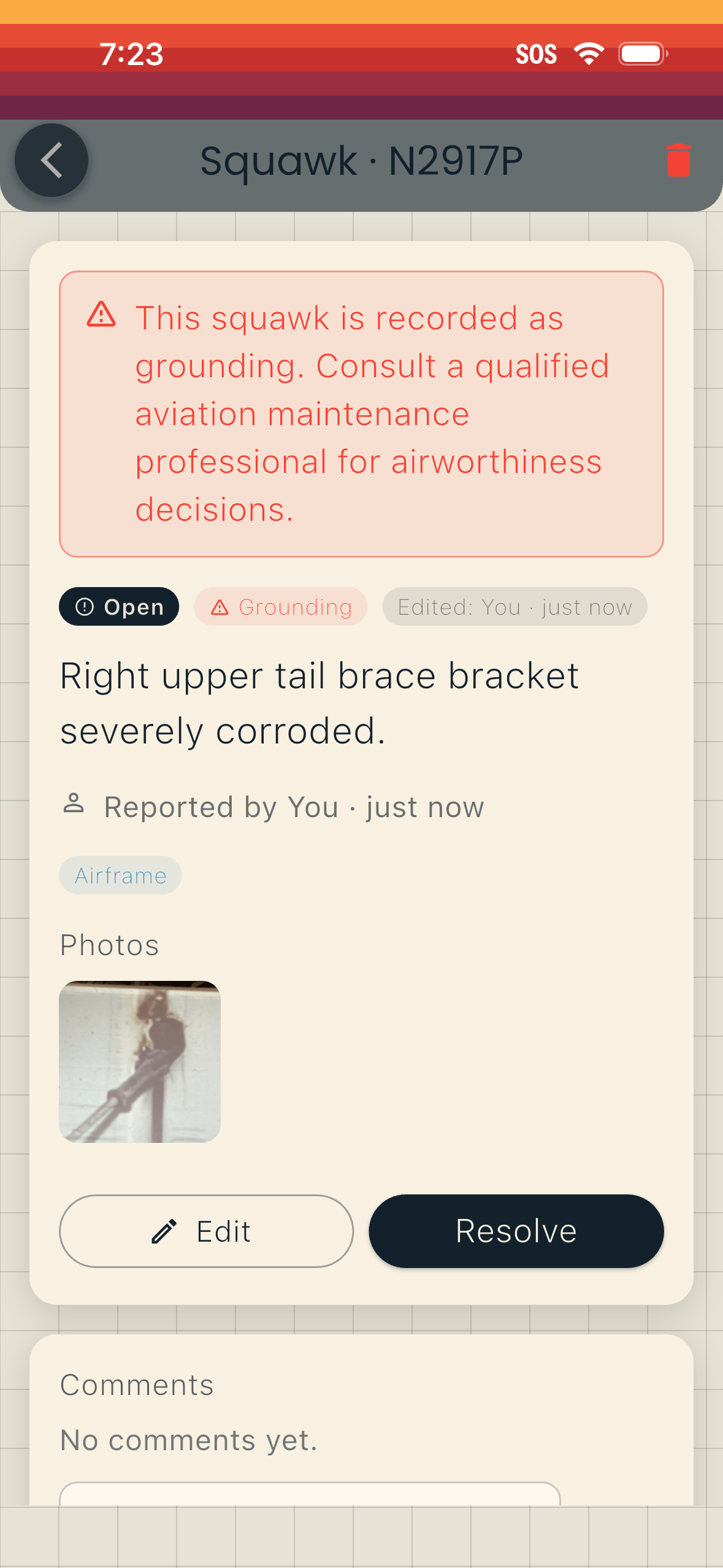
Officers and Managers can create squawks. Tap Squawk on the aircraft card, or open Squawks from the aircraft screen. The Squawks help page explains how to create, comment on, and resolve a squawk.
BetterPlane doesn’t decide airworthiness. A grounding squawk is a flag for your airplane.
Monthly Flight Hours and Trends
Version 1.17.0 adds a view of the hours you fly each month, on the aircraft card and in the full Flight Data view. Fuel burn, oil consumption, and flight hours now each show their recent history next to the average.
If you fly with only a Hobbs meter, you can now log fuel and oil top-offs too (1.16.2). We also made saving an hours entry more reliable on weak connections.
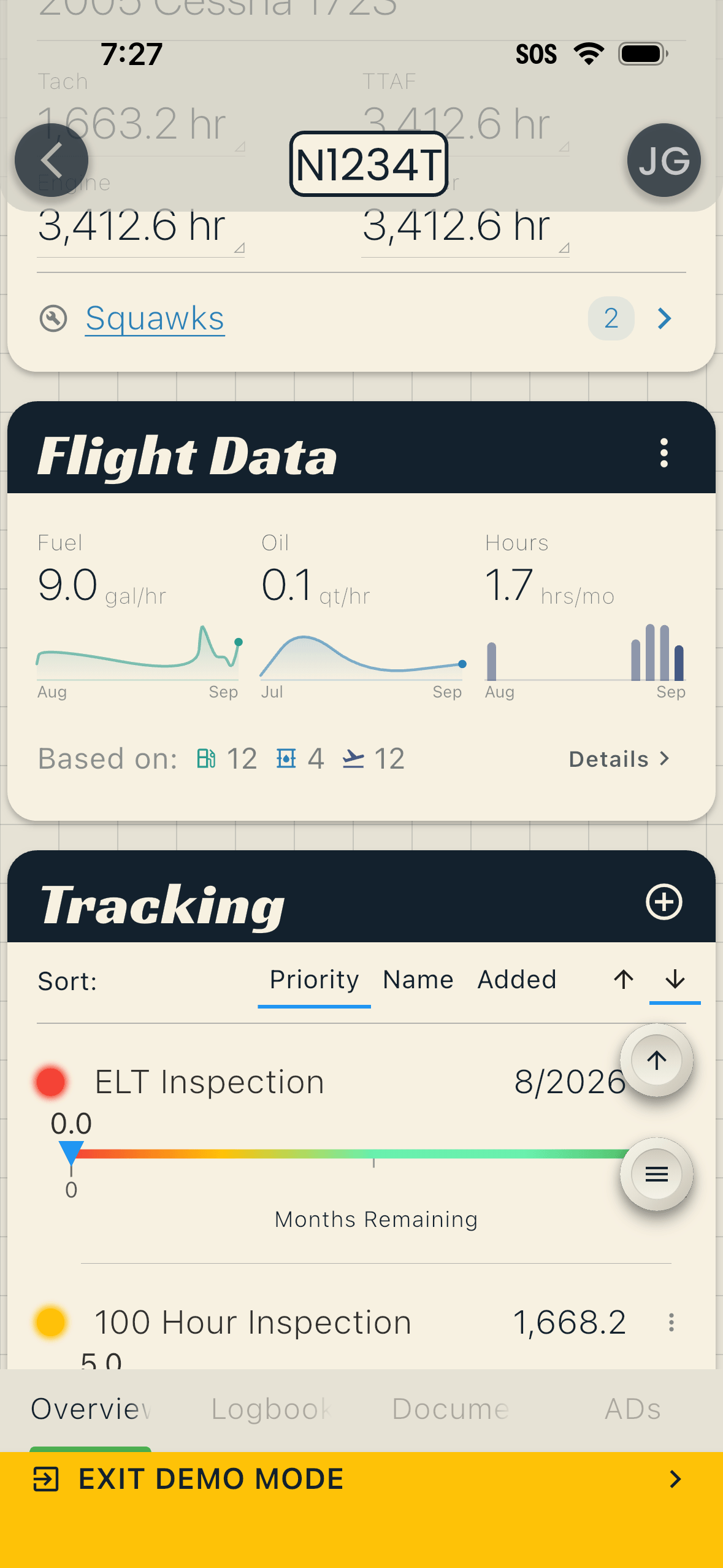
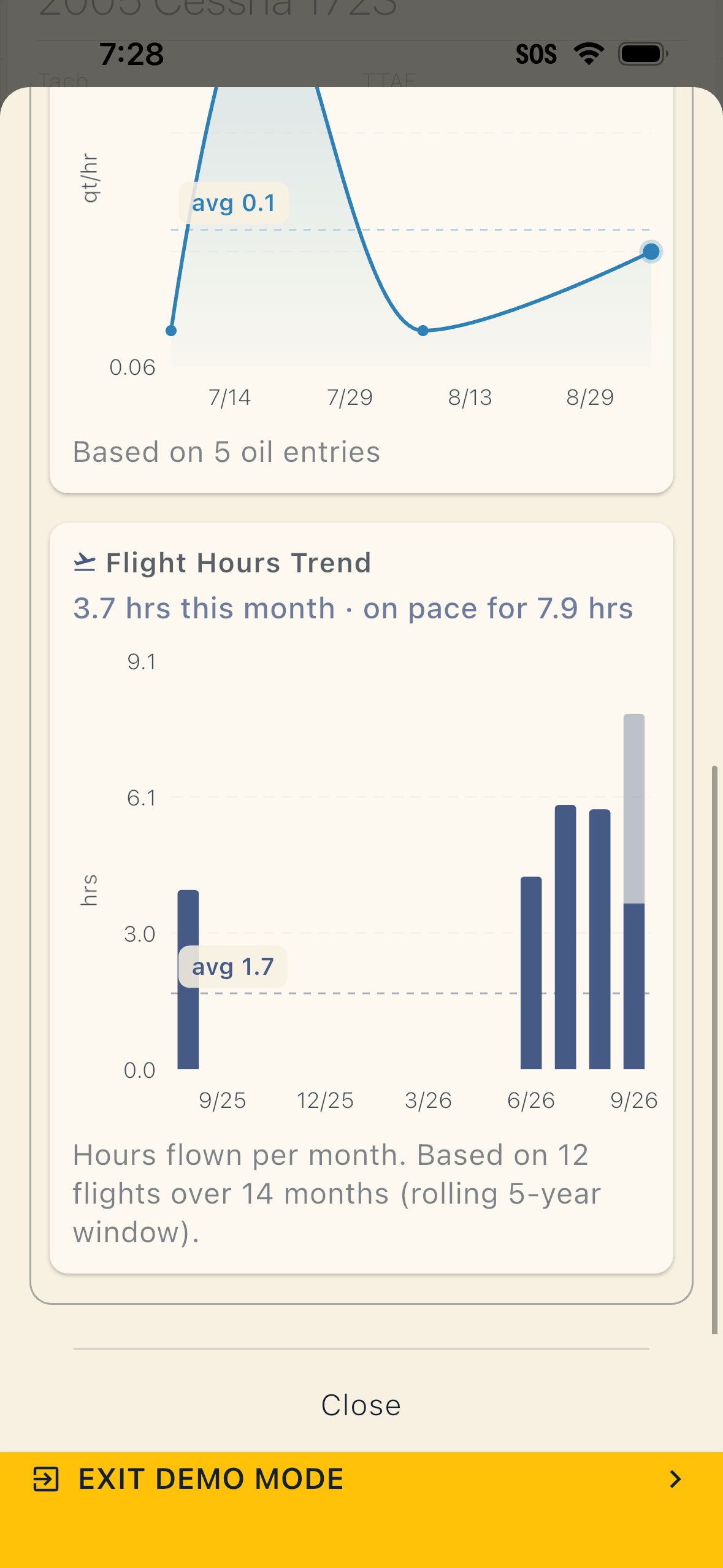
Left: the Flight Data card on the aircraft overview, with a trend beside each average. Right: the full monthly hours chart, with this month’s pace shown in the lighter bar.
Arrange Your Annunciator Lights
The annunciator panel on the aircraft overview shows one light per alert. As of 1.16.0 you can put them in whatever order makes sense to you: tap the reorder button in the panel header, then drag or tap two lights to swap them. Your layout saves across all your devices.
New: The BetterPlane Help Center
The new Help Center at betterplane.com/help has instructions and screenshots for scanning logbooks, tracking hours, and managing squawks.
If you’re new, the Setup Checklist will help you add your aircraft, upload logbooks, and set up hours and alerts. If a page is missing or wrong, tell me and I’ll fix it.
Smaller Improvements
- Oil top-offs log immediately: tapping Oil now opens the entry right away
- Camera access help: if camera permission is off when you scan or take a photo, the app shows how to turn it back on, with a button straight to Settings
- The screen stays awake during logbook uploads, and the upload dialog fits short windows
- PDF viewer zoom controls: buttons, a slider, fit to page, and a wider zoom-out range
- Dozens of stability fixes and library updates across both platforms
In the Works: Automatic AD Tracking
Back in the summer update, tapping an AD reference in a logbook entry started pulling up the full FAA directive, with its status and supersession history. Since then, I’ve been working on automatically finding ADs for each aircraft.
When you add an aircraft, or whenever you ask, BetterPlane searches the FAA AD database for directives that name your airframe, engine, and propeller, and drops the matches into a review queue. Separately, a scanner reads through your logbook entries for AD references and lines each one up against the directive it points to, including old directives that have since been superseded. If your logbooks have forty years of AD compliance entries in them, that history shows up next to the AD. From there you keep the ADs that apply, dismiss the ones that don’t, and set a recurring alert on any tracked AD.
The scanner and the supersession logic are built, and I’ve spent the last few weeks tuning them against real logbooks. It will be ready to ship in the upcoming weeks.
Current Version: 1.17.4
The current public release is version 1.17.4 on iOS and Android. If you’re on an older version, update to get everything above. Version 1.17.6 is in beta now, with faster loading for document folders and attachments, and it’s headed to the stores next.